Why product teams are not faster with AI tools alone
Most product teams that add AI tools don't get faster — they get busier. A researcher uses one tool to synthesise interviews. A PM uses another to draft requirements. A designer uses a third to generate concepts. Each produces output, but the outputs don't connect. Context gets lost between steps. Reviews pile up.
The promise of AI-orchestrated product development isn't about any single tool — it's about whether those tools are coordinated around a shared workflow, shared context, and clear accountability.
The real problem: AI speeds up tasks, not the system
AI is good at tasks. It can summarise a document, generate copy variants, or produce a first-draft PRD in seconds. What it doesn't do is move work through a system.
Task-level productivity
System-level productivity
Faster individual outputs
Faster end-to-end delivery
Each tool works independently
Tools share context and pass outputs forward
Reduces effort per action
Reduces total coordination overhead
Measured in minutes saved
Measured in cycle time and decision speed
Product teams feel the difference. Individual tasks get easier, but sprint velocity stays flat. The bottleneck shifts from "writing the brief" to "aligning on the brief" — and AI doesn't fix that automatically.
What is AI orchestration in product development?
AI orchestration in product development is the coordination of AI tools, outputs, and human decisions across a product workflow. An orchestrated system connects context — research, decisions, constraints, prior outputs — across every stage, from discovery to delivery, so tools work as a system rather than a set of isolated accelerators.
Why AI tools fail in product teams
AI works without product context
Most AI tools carry no memory of prior decisions and have no access to the product strategy. Every prompt starts from scratch. The output may be technically correct but contextually wrong — and verifying that takes time the team doesn't save elsewhere.
Outputs don't connect
A researcher produces a synthesis. A PM writes requirements in a different tool. A designer generates flows in a third. Nothing links them. Inconsistencies stay hidden until review, where fixing them costs more than catching them early would have.
AI creates more things to review
AI increases output volume: more variants, more drafts, more options. Without a process for evaluating that output, review cycles get longer, and decision-making doesn't speed up.
Nobody owns the workflow
Teams usually adopt AI tools bottom-up. No one agrees on a workflow, no one shares a toolchain, and no one takes responsibility for how outputs move between stages. The result: individually faster contributors, collectively slower team.
Teams mistake automation for orchestration
Automating a task — summarise this transcript, rewrite this story — is not orchestration. Orchestration connects that transcript to the roadmap, ties the rewritten story to the design brief, and routes output to the right reviewer at the right time.
"We see product teams where everyone is using AI, and nobody is shipping faster. The tools are fine. The problem is that every output lands in someone's inbox as a new task to process, not as a step that moves something forward." — CEO, Goodface
Why AI tools create more workflow complexity
Every tool a team adds to a product workflow adds a handoff — a point where context can drop, or intent can get misread. Because AI tools generate output fast, they add handoffs faster than the team can absorb them. Teams that don't redesign their workflow around AI end up managing more artefacts, not fewer: output volume up, alignment overhead unchanged.
AI orchestration vs automation
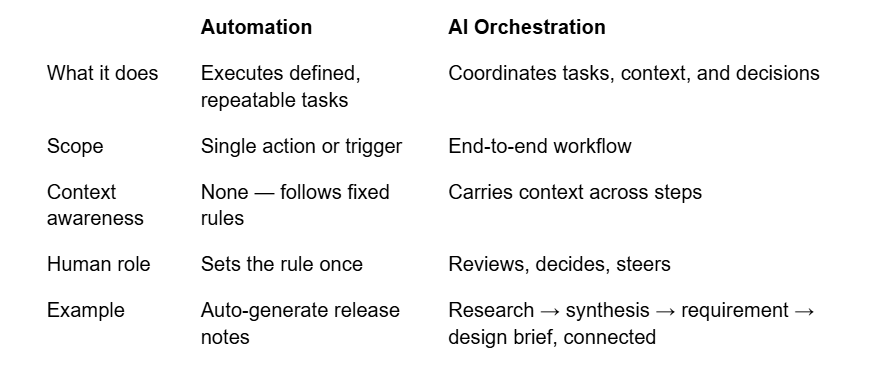
AI workflow orchestration is not faster automation. It's a different layer entirely — one that makes the connections between tasks as reliable as the tasks themselves.
Where product teams need AI orchestration most
Product discovery — Discovery generates large volumes of qualitative data. Orchestration connects interview synthesis to problem framing to prioritisation.
Research synthesis — AI can synthesise. Orchestration ensures that synthesis reaches the stages where it changes decisions.
Roadmap planning — Roadmap decisions pull from research, business constraints, and engineering capacity simultaneously. Orchestration keeps those inputs current and linked.
Requirements writing — Requirements need to reflect research findings and design decisions. Orchestration surfaces relevant context at the moment someone writes a requirement.
UX/UI design workflow — UX/UI connected to an orchestrated research-to-brief pipeline produces work grounded in validated insight. Design feedback loops back into requirements rather than sitting in a separate file.
Development handoff — Orchestration keeps design decisions, rationale, and edge cases accessible where developers work, reducing interpretation gaps.
Post-launch learning — Orchestration closes the loop between post-launch signals and the next planning cycle, rather than leaving it to a quarterly review.
The product team orchestration layer
The orchestration layer sits above individual tools. It defines how context flows between stages, which outputs feed which decisions, and how AI-generated work enters the workflow without creating new coordination overhead.
When it works, the team tags research transcripts consistently, synthesises findings, reaches the roadmap without manual forwarding, and design reviews arrive with the relevant requirement already attached. This isn't a software purchase. It's a workflow design decision — made before the tools are added, not after.
AI does not fix product chaos
Adding AI product management tools to a chaotic workflow produces a faster chaotic workflow — more throughput, same coordination cost. Orchestration solves a different problem: it keeps humans focused on decisions that require genuine judgment — prioritisation, trade-offs, direction — while the system handles routing, context, and handoffs. Work moves reliably from stage to stage. Context stays intact. The team ships faster because the workflow holds together, not because individual tasks got quicker.